Help & onboarding
Users enable 2FA when they understand what they gain, not what they risk
Replace fear warnings with concrete benefits — unauthorized access prevention, data protection, login alerts — and users are more likely to enable 2FA.

Help & onboarding
Users enable 2FA when they understand what they gain, not what they risk
Replace fear warnings with concrete benefits — unauthorized access prevention, data protection, login alerts — and users are more likely to enable 2FA.
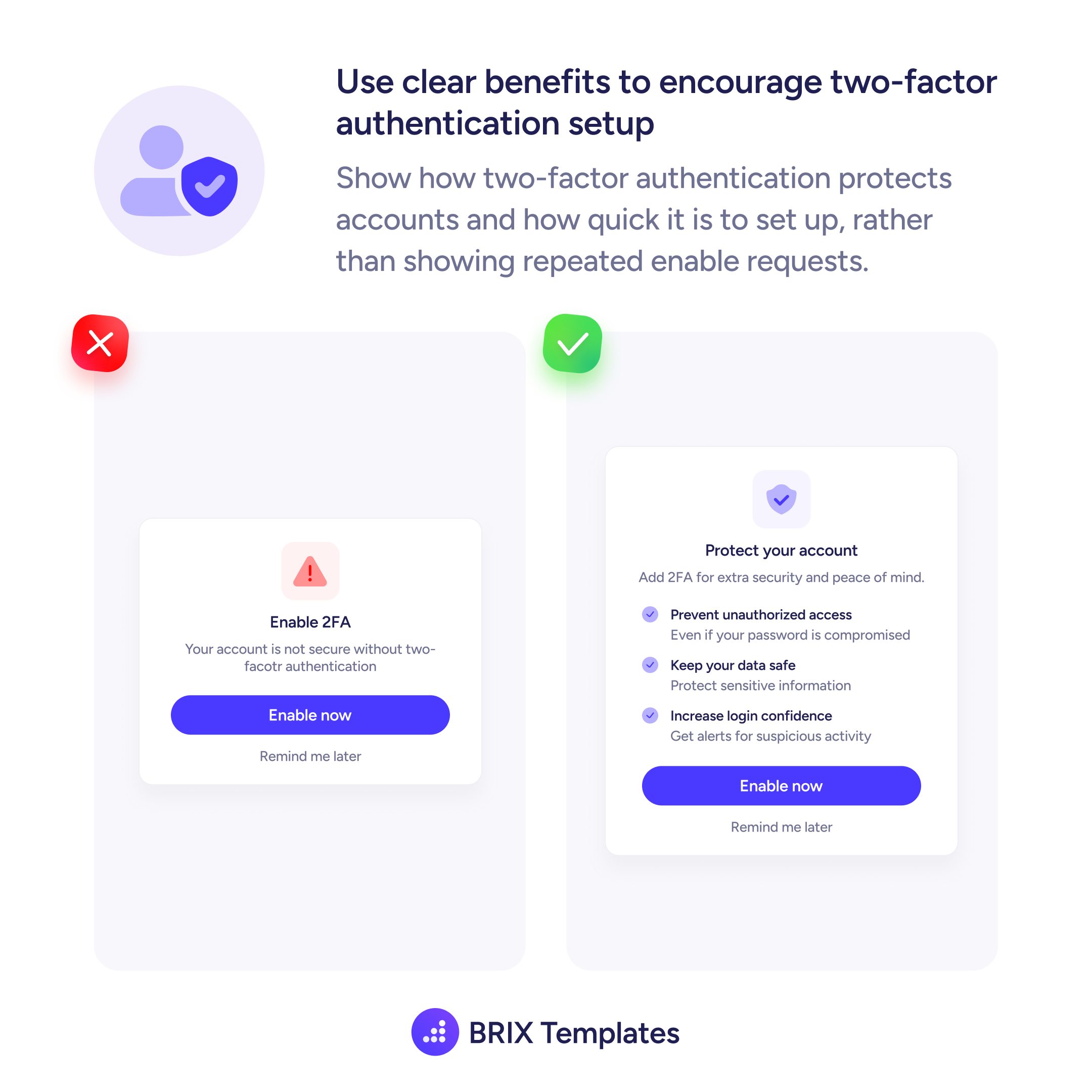
When a 2FA setup prompt leads with a warning — “Your account is not secure without two-factor authentication” — it frames the action as a correction to a failure. Users who feel scolded often dismiss or defer, and the prompt becomes noise they learn to ignore.
A more effective pattern is to reframe the prompt around what the user gains. Instead of a threat, present a benefit-first headline (“Protect your account”) followed by a short list of specific protections: preventing unauthorized access even after a password leak, keeping sensitive data safe, and receiving login alerts. This structure makes the value exchange clear before the user is asked to act.
When designing this kind of prompt, lead with the outcome, not the risk. Use a positive headline that names the protection the user receives, then support it with two or three concrete benefit items — each short enough to scan in a second. Keep the call-to-action label (“Enable now”) and the deferral link (“Remind me later”) identical to the warning version; the structural options don’t need to change, only the framing does.
Benefit-first framing can make a 2FA prompt feel like a helpful feature rather than a compliance demand, which often makes users more willing to complete the setup.
A benefit-focused prompt — highlighting what the user gains, like account protection and login alerts — tends to feel less threatening and more motivating than one that leads with warnings about insecurity.
Replace threat-based copy with a benefit headline such as 'Protect your account' and add two or three specific items: for example, preventing unauthorized access even if a password is compromised, protecting sensitive data, and getting alerts for suspicious activity.
Two to three specific, concise benefits are usually enough. More than that can feel like a feature list; fewer may not make the value clear. Each item should be scannable in under two seconds.
Yes. Removing the deferral option often increases immediate dismissals or frustration. Keeping a low-friction escape like 'Remind me later' respects user autonomy while still surfacing the prompt regularly until they act.